
Using Event App For Corporate Conferences

Event Management Tools, Event Returns Using Event App For Corporate Conferences 2 min read April 13, 2020 Facebook-square X-twitter Google-plus-g Pinterest Linkedin Envelope Hosting a corporate conference can be very stressful. Not only do you have to put a lot of work into finding the right materials, but you also need to find a way to share them with the attendees. You need to have a good schedule and you have to stick to it as well. There’s a lot of work that goes into this, and it is a nice idea to make the process simpler. And that may be a good reason for you to use the HostEvent app for all corporate conferences. Our solution allows you to create an event app specifically for your conferences and customize it based on your needs. Here are some good reasons why! Your team can start collaborating before the event Most of the time your team before the business event works in isolated silos as everyone have to fulfill their own specific tasks. By creating a mobile app with HostEvent, you get to eliminate the pressures, have team members work collaboratively and focus on achieving results more than anything else. Private messaging Using this app for your business conference allows you to enable private messaging between team members. As a result, they can connect with the event attendees in no time, and drive better engagement between themselves. It’s easy to manage event attendees It’s important to know how many people will attend the conference in the first place. That’s why we recommend you to use a mobile app created via HostEvent. You can make it easy for the attendees to register, and you can even have multiple registration options if you want to. Agenda sharing Thanks to the mobile app, you can share the conference schedule and agenda as well. The app can also allow every attendee to create his own profile. Of course, you can add guidelines for everything such as interests, introductions, conference location, and company role and so on. Moreover people can read the content and see the entire agenda before they come to the conference event. Surveys A mobile app created via HostEvent can also be used for surveys. You can create and share surveys before and also after the business meeting. It’s a nice and convenient way to acquire insights and also receive feedback. It’s simple, efficient and it does tend to work very well in this situation. This can also be a good solution to track the overall conference engagement. Start discussions Every app can include a QA forum or a Facebook like activity if you want to. This leads to some amazing benefits and results in the long run, which can easily be adapted to suit your specific needs. That will make the process fast and easy, and the return on investment will be second to none all the time. Introducing guests is a lot easier And it all comes down to the Speakers feature. This feature can be used to showcase new speakers and their role as well. It’s better to showcase any speaker or guest information beforehand, as everyone will know who all are there and their backgrounds. That will make it easier to break the ice and encourage conversations as well. In addition, an event organizer app for your conference meeting can also track engagement via the leaderboard feature, not to mention the facility to share videos and images from old events. One thing is certain, if you create an app with HostEvent you will make every corporate conference a lot more interesting and vibrant. Don’t hesitate and check out our platform if you want to create a custom app for your conference! SHARE THIS ARTICLE Facebook-square X-twitter Google-plus-g Pinterest Linkedin Envelope TAGS Corporate Events corporate planning app university conferences You might also like Event Engagement, Event Planning, Event Returns How To Stay On Budget When Organizing An Event? 2 min read December 8, 2018 Event Engagement, Event Planning, Event Returns How To Bring Life To Any (Even The Most Specific) Event? 2 min read December 8, 2018 Event Engagement, Event Planning, Event Returns Indispensable Event App Features That Will Make Your Event More Appealing 2 min read December 8, 2018 Event Engagement, Event Planning, Event Returns An Ideal Entertainment For Any Event 2 min read December 8, 2018 Event Engagement, Event Planning, Event Returns The Basic Steps To Successful Event Planning 2 min read December 8, 2018 Event Engagement, Event Planning, Event Returns Top 11 Easy Steps To Plan A Corporate Event 2 min read December 8, 2018 Leave a Reply Your email address will not be published. Required fields are marked * Comment * Name * Email * Website Event Engagement, Event Planning, Event Returns How To Generate Higher ROI On Training Investment 2 min read December 8, 2018 Event Engagement, Event Planning Choosing The Right Entertainment Format For Your Event 2 min read April 13, 2019 Event Engagement, Event Management Tools, Event Planning 6 Things To Consider When Choosing An Event Organizer App 2 min read February 2, 2019 Event Engagement, Event Planning Training Events: From Planning To Specific Tips & Tricks 2 min read June 14, 2019
Using App For Training, Seminar, University Conferences

If you want to host a conference then you know how hard it can be to offer a meaningful experience for everyone. HostEvent can help you doing that
Why Native Mobile App?
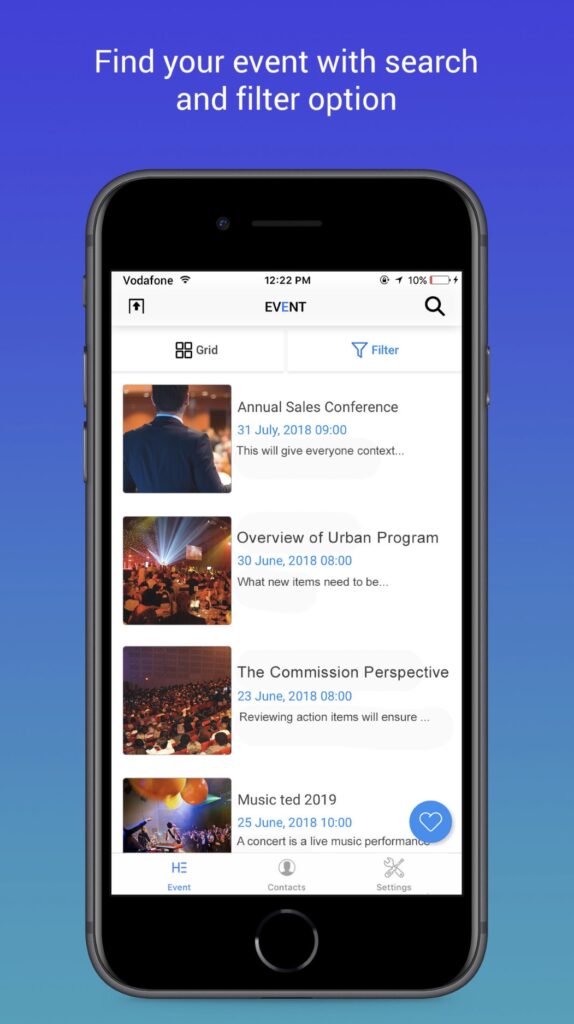
Event Management Tools, Event Returns Why Native Mobile App? 2 min read April 13, 2020 Facebook-square X-twitter Google-plus-g Pinterest Linkedin Envelope article reference from conferencecompass Native apps are developed specifically for a particular mobile device and are installed directly onto the device itself. Users download the app via app stores such as Apple App Store, Google Play, etc. Native apps are built for specific mobile operating systems such as Apple iOS or Android OS. An app made for Apple iOS will not work on Android OS or Windows OS. So if you want your app to work across all major mobile operating systems, you have to build separate apps for each operating system. This means more money and more effort (time & resources). Pros They can be used offline, which makes them faster to open and accessed anytime. In some cases, the performance is faster because they store information locally and only synchronise with the server after the user is done using the app. They allow the user to use device-specific hand gestures. Android and iOS are gradually developing different conventions for interaction, and a native app responds the way its user expects. Native apps get the approval of the app store they are intended for, which means most of the time the user can be assured of improved safety and security of the app. They allow direct access to device hardware that is either more difficult or impossible with a mobile app (camera, accelerometer, etc.) Cons More expensive to develop, especially when the app needs to be compatible with multiple mobile operating systems, thus multiplying the development costs. Cost of app maintenance is higher (especially if this app supports more than one mobile platform). Getting the app approved for the various app stores can prove to be long and tedious for the developer. Use of the app is contingent on the user’s willingness to download and install the app onto their mobile device. HostEvent mobile apps are native for iOS and Android. Download them for your Apple device in App Store or for your Android device in Google Play. SHARE THIS ARTICLE Facebook-square X-twitter Google-plus-g Pinterest Linkedin Envelope TAGS event management event planner mobile app native event app send invite You might also like Event Engagement, Event Planning, Event Returns How To Bring Life To Any (Even The Most Specific) Event? 2 min read December 8, 2018 Event Engagement, Event Planning, Event Returns An Ideal Entertainment For Any Event 2 min read December 8, 2018 Event Engagement, Event Planning, Event Returns The Basic Steps To Successful Event Planning 2 min read December 8, 2018 Event Engagement, Event Planning, Event Returns Event Marketing Tips Any Event Planner Should Know 2 min read December 8, 2018 Event Engagement, Event Planning, Event Returns A Few Common Mistakes When Organizing Corporate Events 2 min read December 8, 2018 Event Engagement, Event Planning, Event Returns Training Events: From Planning To Specific Tips & Tricks 2 min read December 8, 2018 Leave a Reply Your email address will not be published. Required fields are marked * Comment * Name * Email * Website Event Engagement, Event Planning, Event Returns How To Generate Higher ROI On Training Investment 2 min read December 8, 2018 Event Engagement, Event Planning Choosing The Right Entertainment Format For Your Event 2 min read April 13, 2019 Event Engagement, Event Management Tools, Event Planning 6 Things To Consider When Choosing An Event Organizer App 2 min read February 2, 2019 Event Engagement, Event Planning Training Events: From Planning To Specific Tips & Tricks 2 min read June 14, 2019
Mobile Web Apps
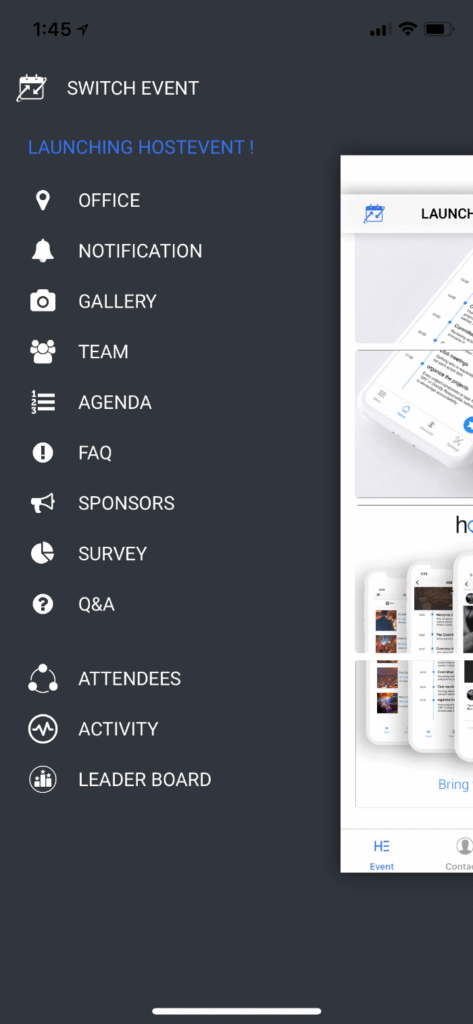
Event Management Tools, Event Returns Mobile Web Apps 2 min read April 13, 2020 Facebook-square X-twitter Google-plus-g Pinterest Linkedin Envelope article reference from conferencecompass Web apps are basically internet-enabled applications that are accessible via the mobile device’s Web browser. Users don’t need to downloaded and install the app onto the mobile device in order to access it. The app is written as web pages in HTML and CSS, with the interactive parts in Jquery, JavaScript or similar language. Meaning that single web app can be used on most devices capable of surfing the web, regardless of the operating system they use. Let’s see what the Pros and Cons of a mobile web app are. Pros They are instantly accessible to users via a browser across a range of devices (iPhone, Android, Windows, etc.). They are much easier to update or maintain by the developer. If you want to change the design or content of a mobile web app, you simply publish the update to the server and the changes are immediately visible. They are much easier for users to discover since their pages can be displayed in search results and listed in common search engines such as Google or Bing. Visitors to your regular website can be automatically sent to the mobile web app when they are on a handheld mobile device (by using device detection). Just like a standard website, mobile websites / web app can be developed as database-driven web applications that act very much like native apps. The development is considerably more time and cost-effective than development of a native app, using programming languages and technologies that are more commonly understood and have a much larger developer base. Cons Mobile Web apps only have limited scope as far as accessing a mobile device’s features is concerned (device-specific hand gestures, sensors, etc.). There are so many variations between web browsers and browser versions and phones that it makes it challenging to develop a stable web-app that runs on all devices without any issues. They are not listed in ‘App Stores’. So if someone is looking for your app in the app store, they will be unable to discover it though such means. Since there is no standard quality control system for Web apps, users may not always be guaranteed safety and security of the app. Web apps are unavailable when offline, even as a basic version. So, which is better – a native app or a web app? It depends on your end goals. If your goal is to establish a broad mobile presence, then you should go for a mobile web app. If your goal is to provide an application that needs to work more like a computer program than a website, rich with interaction, a native mobile app would be the best choice. As mentioned above, web apps have to be built by the event organizers themselves. They have to also figure out where the event will be hosted and work with payment service providers to sell tickets and collect money. Native apps can be built on platforms like the HostEvent event software with minimal effort and are extremely cost effective, easily built in less than 30 minutes. Payment service providers are integrated with the app and the app is hosted on the HostEvent data center. With HostEvent you get the following event management features: In-app discussions. Private messaging. Social media activity page (like Facebook, etc.). Agenda. Sharing media (photo, documents, videos). Surveys. Q&A discussion forum. Registration/ticketing option. Sponsors. Speakers. Important information announcement. Instant notifications, etc. To add icing to the cake, HostEvent gives you the opportunity to host your event app absolutely free for the first event. Sign up now take advantage of the offer. Mobile App Menu Screen SHARE THIS ARTICLE Facebook-square X-twitter Google-plus-g Pinterest Linkedin Envelope TAGS event trends event trends 2020 major event trends what are major event trends You might also like Event Engagement, Event Planning, Event Returns Major Event Trends Of 2020 2 min read December 8, 2018 Event Engagement, Event Planning, Event Returns How To Stay On Budget When Organizing An Event? 2 min read December 8, 2018 Event Engagement, Event Planning, Event Returns How To Bring Life To Any (Even The Most Specific) Event? 2 min read December 8, 2018 Event Engagement, Event Planning, Event Returns Indispensable Event App Features That Will Make Your Event More Appealing 2 min read December 8, 2018 Event Engagement, Event Planning, Event Returns An Ideal Entertainment For Any Event 2 min read December 8, 2018 Event Engagement, Event Planning, Event Returns The Basic Steps To Successful Event Planning 2 min read December 8, 2018 Leave a Reply Your email address will not be published. Required fields are marked * Comment * Name * Email * Website Event Engagement, Event Planning, Event Returns How To Generate Higher ROI On Training Investment 2 min read December 8, 2018 Event Engagement, Event Planning Choosing The Right Entertainment Format For Your Event 2 min read April 13, 2019 Event Engagement, Event Management Tools, Event Planning 6 Things To Consider When Choosing An Event Organizer App 2 min read February 2, 2019 Event Engagement, Event Planning Training Events: From Planning To Specific Tips & Tricks 2 min read June 14, 2019